Control Exactly Who Can Touch Every File
Security starts with identity. Files.com gives you single sign-on across every major directory, automatic provisioning that tracks who joins and leaves, nine permission levels granted per user or per group, and admin roles you can scope down to a single folder. Run one team or a Fortune-2000 enterprise on the same access model, without writing custom provisioning glue and without losing track of who can reach what.
Identity Is The Foundation Everything Else Sits On
Get access wrong and every other control on the File Orchestration Platform is built on sand. Files.com answers four questions: who is the person, how do they sign in, how do they get on and off the system over time, and what are they allowed to touch. Each answer is a setting you turn on and tune, not a fixed behavior you have to work around.
Every one of these controls works from the web admin, the API, CLI, and SDKs, and Terraform. Click it on in the browser, or manage your whole access model as code alongside the rest of your infrastructure.
How People Sign In
Connect the directory you already run, require a second login step where it matters, and let your provider create and remove accounts automatically.
Single Sign-On With Your Existing Directory
Let people sign in with the same account they already use everywhere else. Files.com supports SAML and OpenID Connect, with named connectors for Okta, Microsoft Entra ID, Active Directory, Google, JumpCloud, OneLogin, Auth0, Duo, and any SAML-compliant provider. You can run more than one provider on a single site, so internal staff sign in through your directory while outside vendors sign in with a Files.com password.
Two-Factor Authentication You Can Enforce
Two-factor authentication adds a second login step beyond the password, using hardware security keys, authenticator apps (TOTP codes), SMS, and email. People can enroll more than one method. On Power and Enterprise sites you can require it for everyone, or just for administrators, so a stolen password alone never gets anyone in.
Automatic Provisioning That Tracks Your Directory
Turn on SCIM and Files.com mirrors your directory automatically. SCIM is the standard protocol that lets your identity provider create, update, and deactivate accounts for you. Accounts get created, group memberships get applied, and access gets cut off the moment someone leaves, so you never set up file users by hand and a departing person keeps no access you forgot to revoke. SCIM works with SAML providers, and the sync runs on a schedule your provider sets, not a fixed Files.com interval. You can also provision through the API and CLI or by importing a CSV.
Hand Out Exactly The Right Slice Of Control
Delegated administration is the point: let a team run its own area without handing anyone the keys to the whole site.
Site Administrator
Full control over the whole site. Keep this set small, and keep at least one site administrator on a password login so a directory outage can never lock you out.
Folder Admin
Owns one folder tree, including its settings, automations, and contents. Can grant or remove other people’s access to it, recursively into subfolders. Cannot touch the rest of the site, create groups, or edit other users.
Group Admin
Manages only the people in their own group: creates, edits, enables, disables, and resets passwords. A site administrator decides exactly which of those powers each group admin holds. One person can run several groups, and a group can have several admins.
Read-Only, Workspace, Partner, And Billing Admins
Hand out narrower slices: a read-only admin who sees settings but changes nothing and gets alert emails, a workspace admin scoped to one workspace, a partner admin who runs only their own partner boundary, and a billing admin who sees invoices but no files.
Permissions Built For Real Scale
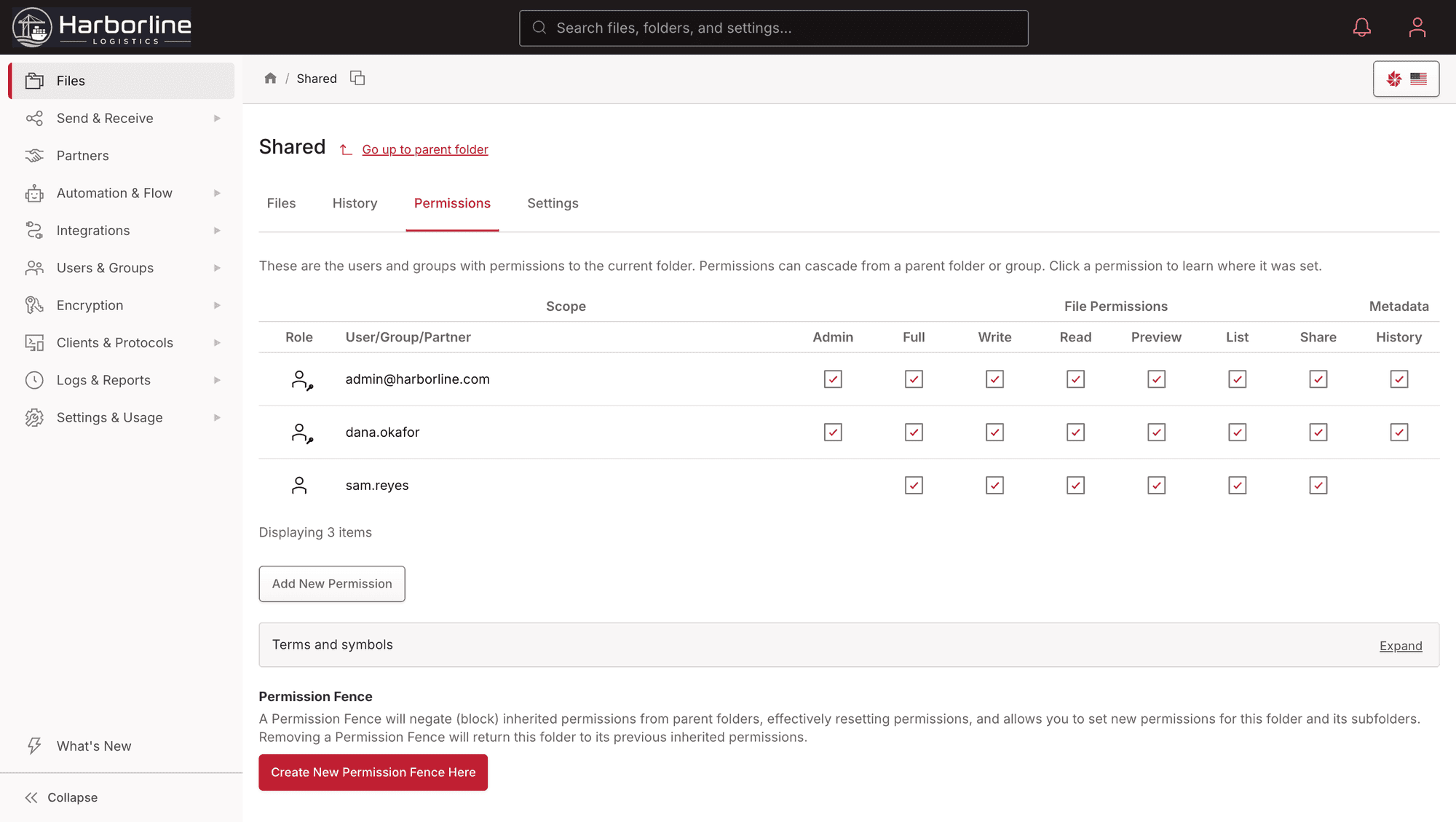
Nine Permission Levels, Per User Or Per Group
Grant access at the level the job needs, from full folder admin down through read/write, read-only, write-only (upload but never see what’s there), list-and-preview (look but no download), share-link creation, and history. Grant it to a person, or grant it to a group and have it apply to every member at once. So a vendor can drop files in without ever browsing the folder, and nobody holds more access than their job calls for.
One Grant, Every Member
Assign access to a group, not to people one by one. Add a folder to a group and everyone in it gets in immediately. Add a person to the group and they inherit everything the group can reach. A single site handles tens of thousands of users this way.
Allow-Only By Default
Everyone starts with no access, and only the grants you make apply. A person’s access is simply the sum of what they hold directly plus what their groups hold. Permission fences let you stop a broad grant from flowing down into a sensitive subfolder. That keeps a single mistaken grant from quietly exposing data, and it covers you when you migrate off an older system that relied on deny rules.
Secure, Automated, And Auditable
Accounts have a lifecycle, not just a creation date. Lifecycle rules can disable or delete dormant accounts automatically, with warning emails first. Scope them to your password and key users, and leave single sign-on accounts to the directory that owns them. When someone departs, their files and automations transfer to a successor instead of orphaning, so work in flight does not stall on a missing account. Every login, key rotation, and permission change lands in the immutable audit log.
Role-based access and two-factor authentication are on every plan. Single sign-on and enforced two-factor start on Power. Automatic SCIM provisioning is an Enterprise feature.
“Files.com just works. User maintenance is a non-issue with auto deprovisioning, and connecting with external partners has gotten dramatically simpler.”

How Teams Run Access From The Directory
The file exchange is often the last system whose accounts are made by hand. Here is how customers made it follow the directory like everything else.
Join A Group, Get The Folders
SCIM creates the Files.com user when someone joins the directory group and removes them when they leave it, and group membership carries the folder permissions, so nobody grants access by hand and nobody keeps it by accident.
The Shared Login Retired
The shared departmental SFTP account that failed the last audit becomes one account per person, with single sign-on for staff and keys or two-factor for automation. The audit log finally names who did what.
Partners On Their Own Identity
External users authenticate against their own identity provider through your Files.com site, so a vendor’s leaver is cut off when their employer removes them, not when someone on your side notices.
Directory Groups As Admin Roles
Map an identity-provider group to a Files.com admin role and the people who run a folder or a business unit get exactly that scope, granted and revoked by the directory.
User Administration Questions
What teams ask about signing in, provisioning, delegated admin roles, and keeping access to non-web protocols secure.
Files.com single sign-on covers browser sessions and the Desktop App. For SFTP, FTP, or WebDAV, an SSO user signs in one of two ways. The first is through Active Directory or LDAP, the only directories that pass passwords directly over those protocols. The second is by adding an SFTP/SSH key or an API key to their account. Protocol access still works for SSO users. It just authenticates with a key rather than the SSO password.
SCIM runs on a scheduled sync cycle that your identity provider controls, not Files.com. Many providers sync hourly, and several support on-demand provisioning that pushes a single change through immediately. The cadence depends on your provider, so there is no fixed Files.com interval. SCIM also requires a SAML-based provider. OAuth-only setups get just-in-time account creation on first sign-in instead.
A Files.com Folder Admin owns one folder tree and can manage its contents, automations, and access grants, recursively into subfolders, with no power over the rest of the site. A Group Admin manages only the people in their own group. You hand out exactly the slice each person needs and nothing more, so a team runs its own area while you keep control of the whole site.
For SFTP, FTP, and WebDAV under password login, the user appends their two-factor code to the end of their Files.com password, so the second factor reaches those protocols too. TOTP authenticator codes, Yubikey Native OTP, and SMS work this way. WebAuthn hardware keys and email codes apply to the web and Desktop App only. Automation accounts authenticate with API keys or SSH keys and are exempt from interactive two-factor by design.
A Files.com user counts toward billing on first login, not on creation. Each plan includes an allotment of Full Users and System Users, the latter for automated inbound connections, and additional users of each type are available per-unit. Current included counts and per-user pricing are published on the pricing page.
The Files.com Permissions Audit Export produces a complete CSV report of every user and group and the folders they can reach. It is the artifact procurement, compliance, and security teams ask for. An access review is a one-click export instead of a manual reconstruction. Every access grant, login, key rotation, and permission change is also recorded in the immutable audit log.
Connect Files.com to Okta, Microsoft Entra ID or any SCIM-capable identity provider, and deprovisioning follows the directory: when a user is removed or leaves the mapped group, the Files.com account is disabled, its sessions end and its permissions go with it. The LDAP and Active Directory integrations do the same for on-premises directories.
Yes. Files.com supports more than one SAML identity provider on a site, so partner users authenticate against their own provider while your staff use yours, each with its own folder scope and audit trail.
Yes. Files.com applies two-factor authentication and password policy to the people who sign in interactively, and lets automation accounts authenticate with SSH keys or API keys that carry their own controls, so hardening the humans does not break the nightly script.
Stand Up Your Access Model In Minutes
Start a 7-day free trial, connect your directory, and grant the first folder to a group. Watch single sign-on, automatic provisioning, and granular permissions come together on one control plane.
No credit card required • Free for 7 days • Live in minutes