Object Storage Behavior
An object-storage bucket can appear as ordinary folders in Files.com while storing each file under a complete object name. On flat-namespace storage, reports/2026/january.csv is one object key: reports/2026/ is a prefix shared with other objects, rather than a directory containing them.
That difference matters when people create empty folders, rename a directory tree, replace files, or recover deleted data. Files.com presents a folder-based view, while the provider's namespace, versioning, and retention settings determine how the underlying operations work.
Folders and Placeholder Objects
Files.com can infer a folder from the objects below its prefix. A bucket containing reports/2026/january.csv therefore has a visible reports/2026 folder even without a separate directory object. These are implicit folders: removing the last object under a prefix can also remove the folder from a listing.
An explicit placeholder preserves an empty folder. A slash file is a zero-byte object whose name ends in /, such as reports/2026/. Files.com creates these placeholders as needed on flat-namespace Amazon S3, Google Cloud Storage, and Azure Blob connections. Creating an empty folder creates its placeholder; looking up a folder represented only by its children can also create one.
You do not need to create or maintain slash files yourself. They can appear in the provider's console and in other tools using the same bucket. Their contents use almost no storage, but creating and listing them can incur provider requests. Removing a placeholder does not remove objects below its prefix, although an empty folder can disappear when no placeholder or child remains.
Other S3-compatible services also recognize folders inferred from prefixes and explicit slash files. Some tools use other markers, including Backblaze's .bzEmpty and Wasabi's .tt_keep. These are conventions for presenting object names as folders, rather than additional user documents.
This flat-namespace model does not describe every cloud storage configuration. Azure Files has native directories. Azure Blob with a hierarchical namespace also has directory-specific operations. Google Cloud Storage also offers flat and hierarchical namespaces, with different directory and feature behavior. The prefix-and-placeholder explanation here applies to flat namespaces.
Deletion, Replacement, and Recovery
Deleting through a mount acts on the remote object. Files.com's native-storage recovery settings do not preserve a separate copy of that object. Recovery instead depends on the remote provider's versioning, soft delete, retention, or backup configuration.
Without a recovery feature, a deletion removes the object and an overwrite replaces its contents. With versioning, earlier contents can remain after the current file changes or disappears from Files.com's regular listing. For example, a deletion on a versioned S3 bucket adds a delete marker; Backblaze B2 retains file versions and uses hide markers. Other providers have different retention behavior.
The regular Files.com listing shows current files, rather than all retained versions. Those retained versions can continue to incur storage charges. Use the provider's recovery and lifecycle tools to inspect and expire them. Supported S3 connections also offer point-in-time browsing.
Replacement permissions depend on the operation. An upload can write over the current object, while a Files.com copy or move that overwrites an existing destination deletes that destination before writing the replacement. The connection then needs delete permission as well as write permission. The Mount reference and Sync permissions explain these different operations.
Moves and Renames
For a copy-and-delete move, Files.com copies the source object to its new key and then deletes the original. The two operations are not atomic: a failure can leave both paths present. Versioning or soft delete can also retain content under the old key after a successful move.
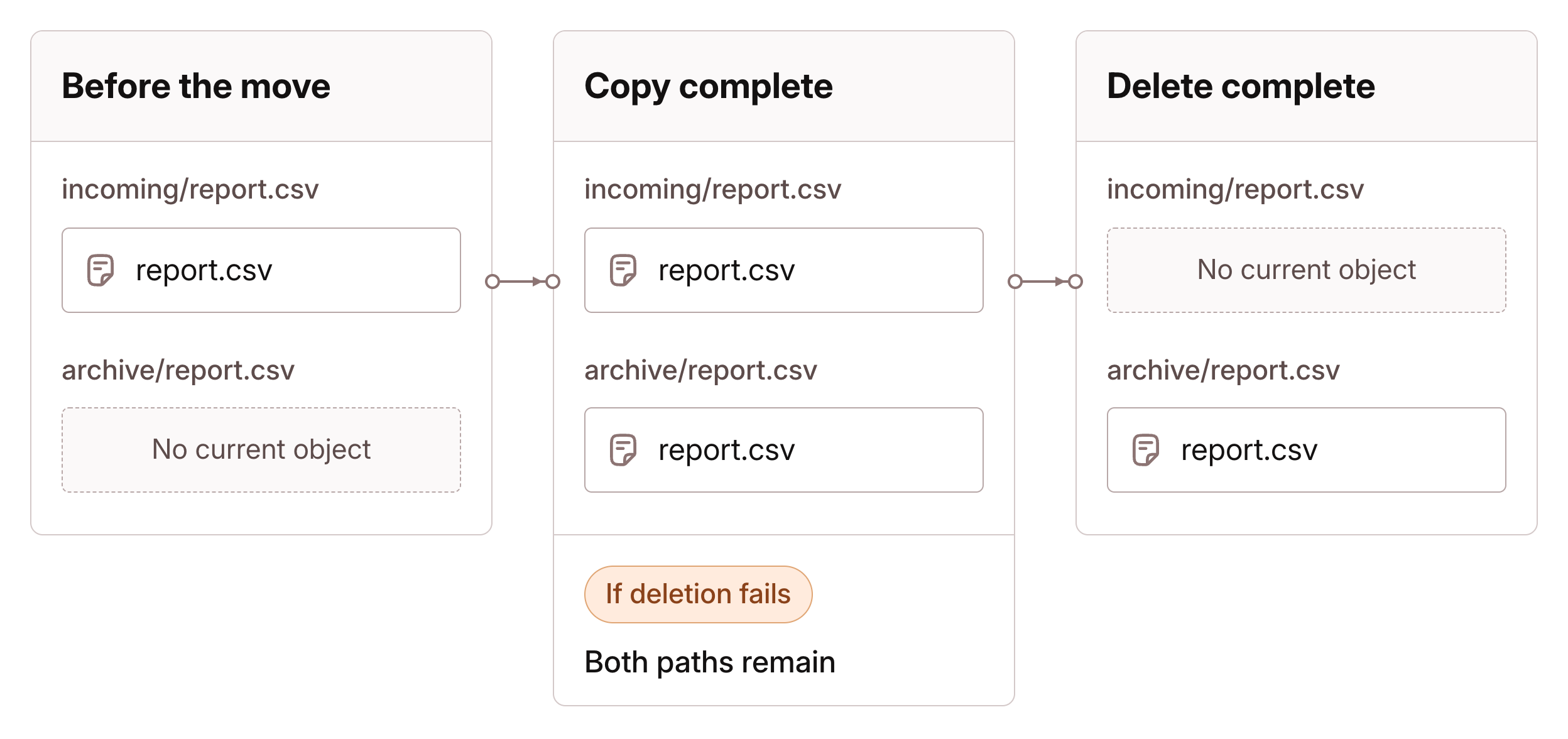
On flat-namespace storage, moving a folder requires processing the objects under its prefix. A folder containing thousands of files can require thousands of object operations, with corresponding time and provider requests. Review the operation's result before treating the whole folder as moved, and coordinate with applications that depend on the original paths.
After a successful move, current files appear at their new paths. Retained versions or deleted content can remain at the previous paths under the provider's recovery rules. Moving the visible folder is therefore separate from permanently removing every retained copy.
Directory-aware connections can behave differently. Azure Blob's hierarchical-namespace guidance explains its native file renames and directory handling.