June 2, 2025
Introducing AI-Powered Orchestration and Management with MCP
AI MCP server for Files.com now available.
This is a field report from inside Files.com on what AI is actually doing in our business — not a vision of where the technology is going, but the workflows that are in production today and the work they replaced.
The honest summary: AI works well at our company because we have a lot of structured and unstructured artifacts of real customer interactions — Zoom recordings, support threads, CRM notes, sales calls — and we archive all of them by default. A model with full transcripts can generate an 80%-complete SOC 2 incident draft, a customer case study, or a follow-up plan in minutes; the same task without the source material takes a human hours and never gets done at scale.
The first thing we learned putting AI to work is simple: data is the fuel. A model can only work with what you actually captured.
So we keep everything. We archive every Zoom call, Help Scout email, and CRM note by default. A "Zoom call" is a recorded video meeting; a CRM note is the short write-up a salesperson leaves after talking to a customer. Each one used to be a throwaway artifact.
Now it's raw material. With a complete recording, a model can draft a case study, an incident report, or a list of sales next-steps. With a partial recording it can do far less, and with no recording at all there's nothing to work from. If a conversation isn't saved, it's lost to the AI.
That changed how we think about keeping data around.
For years the instinct was to delete old data, for privacy or just to save space. We landed in the opposite place: the data we keep is the thing that makes the AI useful. A company that saves and organizes its conversations has the raw material to automate reporting and pull out insights. A company that threw that data away does not.
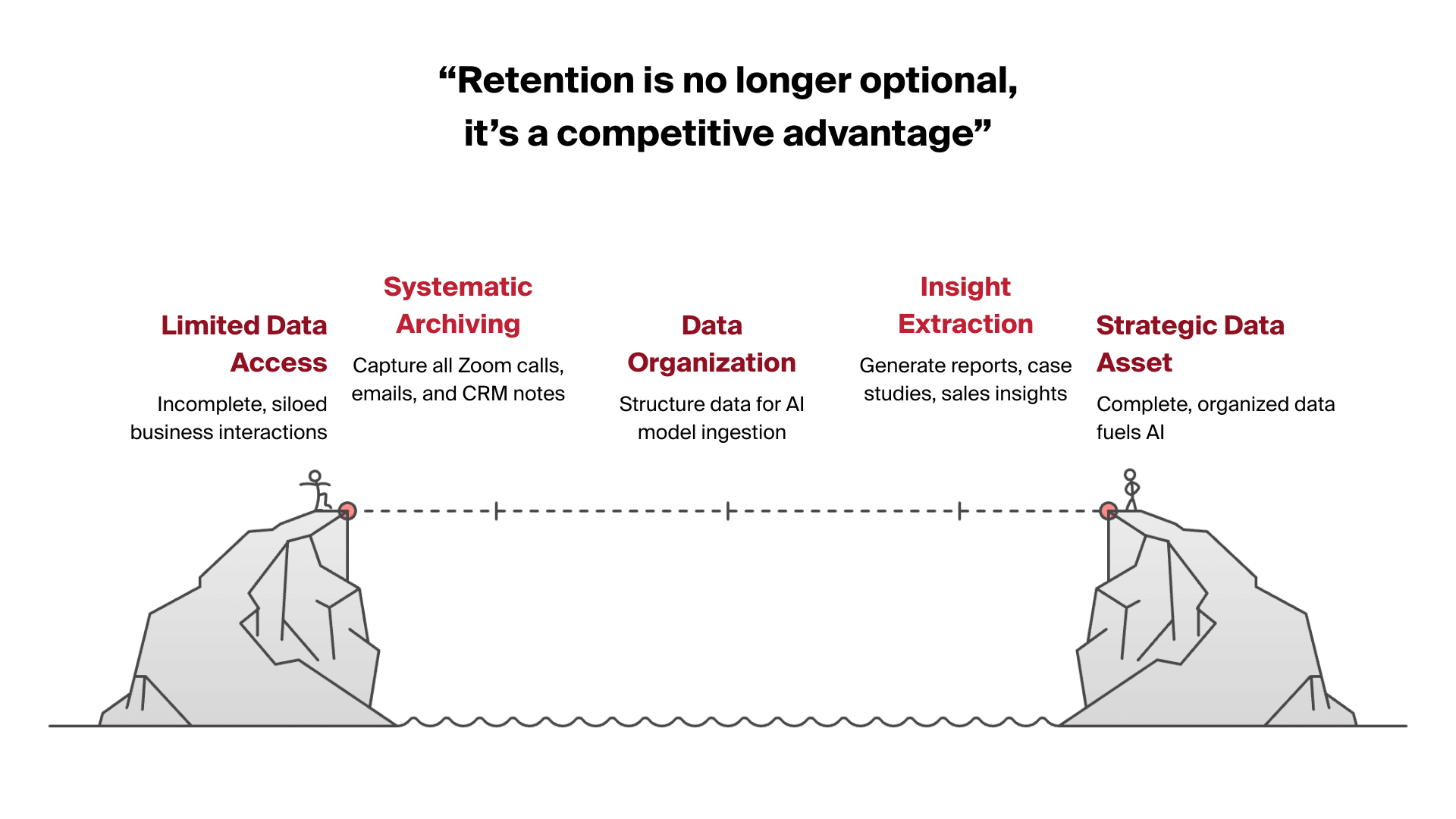
Once we had the data, the next step was turning models into real workflows. The approach we settled on is lots of small, specialized agents, not one tool that tries to do everything. An "agent" here just means a prompt wired to a model that does one defined job. Each agent does its one job well, and we chain them together into a full process.
Case study generation is a good example. Pointed at the transcripts from sales and onboarding calls, a model produces a draft that's roughly 80% complete. The marketing team adds the human touch and finishes the story in much less time than writing it cold. The part that used to mean hours of interviews and drafting is now mostly handled.
Incident reporting works the same way. When a service incident happens, a model drafts both the internal SOC 2 incident report and the customer-facing summary straight from the Zoom transcript. (SOC 2 is the security-audit standard we hold; it requires a written record of every incident.) An engineer who used to spend two to three hours writing those reports now reviews and approves a draft in about 20 minutes.
Sales runs on a chain of agents we nicknamed the Iron Man suit. One agent reads a customer conversation and pulls out the SPICE criteria (Situation, Pain, Impact, Critical event, Evaluation). Another names the business outcomes the customer is after. A third picks the best-fit case study to send in a follow-up. Chained together, they hand the rep a head start, while the rep still makes every real call.
Other teams followed. An accounts-receivable agent drafts invoice reminders and follow-up emails. A CRM-mining agent surfaces stalled expansion opportunities that would otherwise sit unnoticed. The pattern repeats across all of them: a task that used to take hours takes minutes, and the time comes back every single time the job runs.
Getting this to work changed how we think, not just what tools we run.
Specialization wins. One big general prompt gives inconsistent answers. Several small agents, each doing one reasoning task, give reliable ones. Chaining them — one reads the customer's pain points, the next drafts content, the next picks the reference material — gets us accuracy a single prompt never did.
AI and ordinary code go together. If a task can be written as a clear true-or-false rule, like "is this invoice past due," it belongs in code, where it's exact and free. AI earns its keep in the gray areas that need judgment: recommending the right case study, summing up a messy conversation. We use workflow automation for the rule-based steps and a model for the judgment steps.
Productivity takes work up front. None of this was plug-and-play. It took careful workflow design, a lot of prompt writing, and iteration to get an agent reliable. Building one of these processes end to end is real effort — but once it runs, it runs every day without adding a person.

The biggest change has been cultural, not just operational.
AI hasn't replaced anyone at Files.com. It has made each person able to do more. By taking the repetitive, slow tasks off their plates, it frees the team for the work people are actually good at: building relationships, solving hard problems, deciding what to do next. Engineers spend more time building, account executives more time selling, support more time talking to customers instead of copy-pasting.
That's the Iron Man suit again. It doesn't do the work for you. It makes a skilled person able to get much more done in a day.
AI at Files.com is past the experiment stage. It runs in production, and the more conversations we keep, the more it can do. As the models get better, we'll wire more of these small agents into more parts of the business, turning the data we've kept into things we can act on.
The same thinking runs through the product. The platform exposes an AI feature set and an MCP server so a model can work with your files and transfer history directly — the same shape we use on our own data, available to your team. If you want the longer version of how we use our archives to power this, the companion post on the data fabric behind AI walks through it.
If you want to see the platform itself, start a free trial — no credit card, live in minutes.
AI MCP server for Files.com now available.

Many modern cloud architectures rely on APIs and real-time integrations, but files remain a critical part of how enterprise systems exchange data. From vendor data feeds to analytics pipelines, file-based workflows continue to power large-scale data movement across systems. Files.com helps connect applications, partners, and cloud services through secure, event-driven file movement.
rclone is the open-source command-line tool engineers reach for when they need to sync, copy, and move files across cloud storage. It works natively with Files.com — here's how the two fit together in real workflows.
4,000+ organizations trust Files.com for mission-critical file operations. Start your free trial now and build your first flow in 60 seconds.
No credit card required • 7-day free trial • Live in minutes