AS2
Files.com supports the AS2 data transmission protocol for secure Business-to-Business (B2B) file transfers with trading partners that require AS2.
AS2 Functionality at Files.com
AS2 transfers files between trading partners and returns Message Disposition Notifications (MDNs) as receipts. Exchange identifiers and certificates with your partner, then configure your identity and the partnership. Review the compatibility and limits before connecting.
The implementation complies with RFC 4130, the standard that defines AS2.
The AS2 transport preserves the file contents; it does not perform EDI mapping. Use Automations and TransformScripts when your workflow needs to transform data before sending or after receiving it.
How AS2 Works
AS2 (Applicability Statement 2) is a specification describing how to transport structured business-to-business (B2B) data securely and reliably over the Internet. Security is achieved by using digital certificates and encryption.
AS2 uses the HTTP(S) protocol to transmit data and supports S/MIME encryption and digital signatures for the payload. The payload is sometimes referred to as the "message" or "document". Message encryption and signing are separate from HTTPS transport encryption.
AS2 is a peer-to-peer (P2P) protocol where both sides of the connection need to agree to the connection and provide each other with the required information for successful data transmission. These connections are sometimes referred to as "AS2 partnerships".
AS2 was designed for business-to-business transactions, such as Purchase Orders, Invoices, Shipment Statuses, and other business documents, so the two businesses at either end of the AS2 connection are referred to as trading partners.
AS2 coordinates delivery between two trading partners, including how each identifies the other and confirms that a message was received. Understanding that exchange helps administrators agree on compatible settings and distinguish a transmission failure from a problem with the returned receipt.
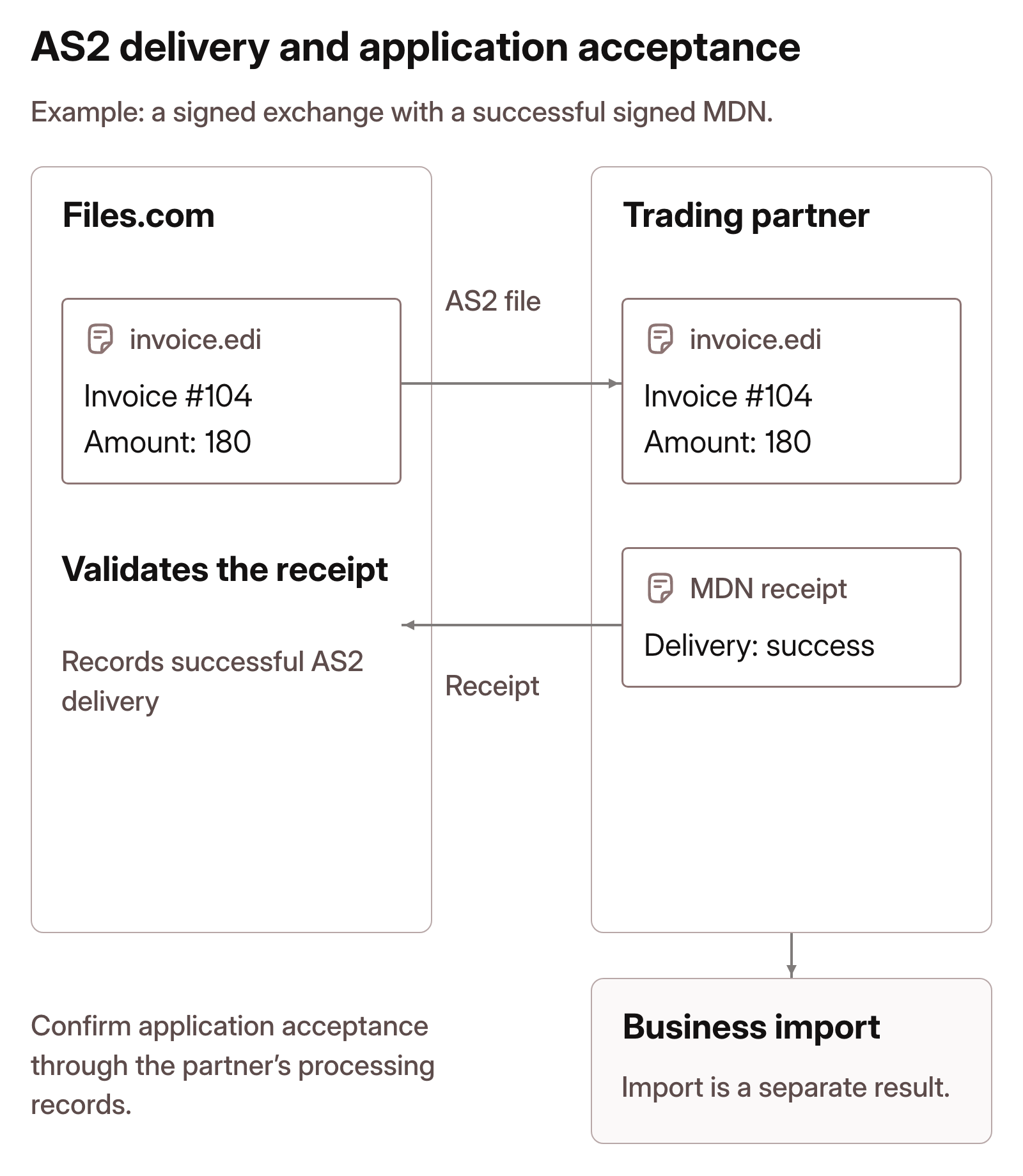
A successful MDN confirms AS2 delivery. The receiving business application processes the file separately; its own records establish whether the import succeeded.
Prior to use, AS2 requires the following items:
- A delivery URL for the sender.
- A delivery URL for the receiver.
- An AS2 Identity for the sender.
- An AS2 Identity for the receiver.
- An encryption and signing certificate and key for the sender.
- An encryption and signing certificate and key for the receiver.
You and your trading partner will provide each other with:
- The AS2 delivery URL.
- The AS2 Identities that you agree to use for the connection.
- The public portion of the encryption and signing certificate being used.
The AS2 delivery URL is sometimes referred to as the "endpoint URL" of your AS2 server or software. This URL typically looks something like https://my.companydomain.com/as2 and ideally uses a valid and chained SSL Certificate.
The AS2 Identities that you agree to use for the connection are sometimes referred to as "AS2 name", "AS2 code", "AS2 station", or "AS2 To and From". The identity is a unique string and can be based on an arbitrary identifier, an EDI interchange ID, a DUNS number, or any other agreed upon criteria.
Your trading partner provides you with the public portion of their encryption and signing certificate. You provide your trading partner with the public portion of your own encryption and signing certificate. These AS2 certificates can be self-signed.
Files.com creates an inbox, outbox, and sent folder for each partnership. Files received from the partner appear in the inbox; placing a file in the outbox sends it to the partner. AS2 folders and incoming filenames explains the folder paths, sent files, and handling of repeated names.
A signed and encrypted exchange with a synchronous signed receipt follows these steps. The required checks depend on the partners' agreed validation settings.
The sending AS2 server:
- Collects the file from the local "outbox" folder that corresponds to the remote trading partner.
- Digitally signs the file using your signing certificate and key.
- Encrypts the file using the remote trading partner's public encryption certificate.
- Sends the file, using HTTP(S), to the trading partner's AS2 URL, and specifies:
- the trading partner's AS2 identity as the recipient (AS2-TO).
- its AS2 identity as the sender (AS2-FROM).
The receiving AS2 server:
- Receives the file, using HTTP(S).
- Checks that the recipient (AS2-TO) matches its own AS2 Identity.
- Checks that the sender (AS2-FROM) matches the trading partner's AS2 Identity.
- Decrypts the file using its private certificate and key.
- Verifies the digital signature using the trading partner's public certificate.
- If all of the above checks, decryption, and signature validation are successful, places the file into the "inbox" folder that corresponds to the trading partner.
- Generates a Message Disposition Notification (MDN) containing the outcome, "success" or "failure", of the delivery.
- Digitally signs the MDN using its certificate and key.
- Returns the signed MDN, using the HTTP(S) response.
The sending AS2 server:
- Receives the HTTP(S) response.
- Verifies the MDN's digital signature using the trading partner's public certificate.
- Marks the delivery as a "success" only if the MDN is both valid and specifies a "success" outcome from the trading partner.
AS2 supports many configurations. The configuration you use is decided between you and your trading partner.
AS2 Port
Files.com receives AS2 transmissions on port 443.
AS2 Compression
Files.com automatically decompresses compressed incoming AS2 transmissions.
Compatibility and Limits
To simplify configuration and provide an easy-to-use experience, certain configuration items are pre-configured or restricted to specific values.
Inbound AS2 does not support HTTP Basic username-and-password authentication. AS2-To identifies your AS2 Identity, and AS2-From identifies the configured trading partner. These identifiers select the partnership; they do not validate the sender's signature. The partner's incoming signature validation level determines whether a valid message signature is required, independently of message encryption.
When Files.com replies to inbound transmissions, the Message Disposition Notification (MDN) is signed using SHA-256.
When Files.com replies to inbound transmissions, MDN delivery is synchronous, so request synchronous receipt delivery in your trading partner's AS2 configuration. If your trading partner requires asynchronous MDN delivery, contact us.
For outbound transmissions, the encryption cipher used is aes-256-cbc and the signing algorithm used is SHA-256.
Files.com supports outgoing AS2 files up to 25 MB. This limit reflects the small EDI payloads our customers exchange and the capacity provided for AS2 message processing; it is not a size limit imposed by the AS2 protocol. If your trading partner needs larger outgoing files, contact us. We welcome the opportunity to review your payload sizes and transfer requirements and work with you on supporting that workflow.
AS2 message records, including payloads and transmitted file contents, are stored in the United States regardless of your site's storage region. The message retention and data residency guidance explains how long these records remain available. The AS2 storage location cannot be changed.
Our AS2 implementation is not Drummond Certified. Let us know if you require this certification in order to use AS2.