Run Their External File Exchange Here
Real companies send and collect files with outside parties on the platform every day.
Real companies. Real file flows. Real results.


An employee with a file too big to email, a nurse sending a record to an outside specialist, a paralegal moving a contract — none of them are trying to cause a problem. They had a file to move and the sanctioned tools made it harder than the unsanctioned ones. Files.com makes the governed path the easy path.
Real companies send and collect files with outside parties on the platform every day.
The top-rated managed file transfer vendor in Gartner Peer Insights, and a Leader on G2 for MFT.
PCI DSS and CSA STAR as well, with a HIPAA BAA and GDPR DPA available — the posture that makes the sanctioned path defensible.
A bespoke file stack run as a managed cloud service since 2010, with no breaches across that history.
A branded share link instead of a personal Dropbox — no harder to use than the consumer tool, with the guardrails the consumer tool never had.
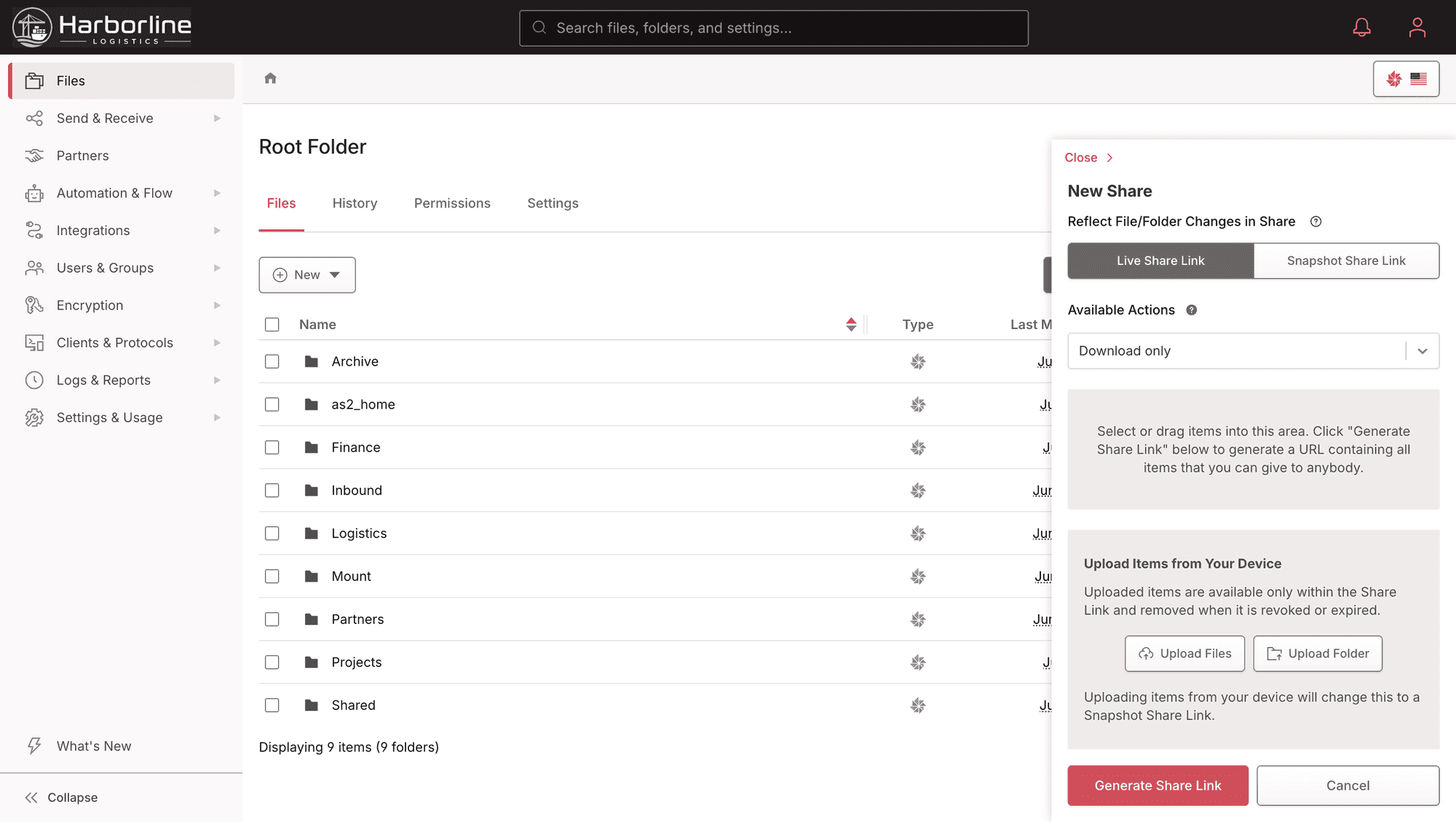
Send one governed URL for a file, several files, or a whole folder. The recipient lands on a page under your own domain, takes what they need without a Files.com account, and is gone — the same two clicks the consumer tool offered.
Lock a link with a password, and lock each invitation to one invited email and one browser so a forwarded link stops being free access. Restrict recipients to approved domains, or make a link single-use so it dies after one download.
Every link can carry an expiration date. The link that used to sit in a personal Dropbox indefinitely now goes away on a schedule you set — and an admin can revoke it before then.
Block download with preview-only mode, overlay the recipient’s identifier on every preview as a forensic deterrent, and require a clickwrap NDA — recorded with timestamp and IP — before access is granted.
“The one-time file upload links, one-time file download links, and the management UI make my work easier and more efficient — they make it easier to gather and share sensitive documents in a secure way.”
“I set up all our users and set up inboxes where our customers can send us files, and everything just works. Email notifications are also a big thing for us — we need to know when we have a new file sent to us, and those just work as well.”
A branded inbox instead of "just email it to me." Outsiders upload without an account; the file lands in a governed folder under IT’s control, not in someone’s mailbox.
A branded Inbox is a fixed URL anyone can upload to without an account and without seeing other submissions. It is the direct replacement for the contractor emailing a timesheet, the outside provider emailing a record, the vendor emailing an invoice.
The file lands in a folder under IT’s control with the permissions and retention you set, instead of in an individual’s inbox where nobody else can find it and nothing is recorded.
Give the inbox its own email address, allowlist the sending domains so only approved addresses can deliver, send auto-reply receipts, and keep an inbound email log of everything that arrived.
The defining failure of the shadow habit is that the file moves and nobody has a record of it — who sent what, to whom, when, or whether it was ever taken down. Files.com replaces that with a defensible, exportable record. Every share creation, every recipient access, every download, every inbox upload, and every inbound email arrival is captured as a discrete event in the immutable audit log, retained for years and exportable on demand or streamed to your SIEM.
In a regulated shop the same record is the difference between a clean answer and a finding. When the breach notification, the regulator, or the closed deal asks who saw the file, the answer is the export — not “we don’t know.”
Administrators set the policy that makes the governed path the only path — so external sharing is a capability the organization grants, not something every employee improvises.
Enforce passwords on all share links, require recipient binding everywhere, cap the maximum link lifetime, and block free or scam email domains as recipients — so external sharing happens within the rails you set, not however each employee improvises.
Nine granular permission levels and SSO-backed identity decide which staff can share externally in the first place. External sharing becomes a capability the organization grants, not a thing everyone does on their own.
Disable a departed user’s account and their share links revoke with it. Folder-level upload restrictions limit what file types an inbox will accept. The exposure that outlives an employee goes away on its own.
The thing being replaced here is a habit. The consumer tools — email attachments, personal Dropbox, WeTransfer — are shadow IT precisely because nobody chose them as a file-exchange platform; they got used because they were nearby. A file dropped on a personal account moves with no expiry, no recipient binding, no domain restriction, and no record. Files.com isn’t pitched as a better version of those tools — it’s the sanctioned path that’s as easy as they are while every transfer carries the controls and the audit you’re accountable for.
SharePoint and Google Drive are the quieter version of the same habit, and the answer is the opposite and just as clean: they’re excellent at internal collaboration and simply weren’t built for governed external exchange. Keep collaborating there. Run the external exchange here, where the link and the inbox are governed and the access is recorded.
“I appreciate the strong security-first approach, granular permission model, and detailed audit logging, which make it easy to enforce least-privilege access and maintain compliance — keeping file operations reliable and well-governed without adding operational overhead.”
“The best features are ease of access and easy-to-secure portals. It is easy to handle automation around encrypted files and to make it easy for our partners to send us the data we need from them — it has saved my team time and reduced errors.”
The questions a vendor security questionnaire asks about how your people share data externally — answered before you ask them.
A bespoke file stack run as a managed service since 2010, with no breaches across that history. AES-256 at rest, TLS in transit, and an A+ rating on Qualys SSL Labs.
SOC 2 Type II, PCI DSS, and CSA STAR, with a HIPAA BAA and GDPR DPA available. Used in production by banks, healthcare, and other regulated industries.
SSO and SAML against Okta, Microsoft Entra ID, Active Directory, LDAP, OneLogin, and Auth0, with role-based access, IP allowlisting, and password policies.
When you need a site-wide sharing policy changed or an inbox stood up, the difference between a managed service and a self-hosted box is who picks up.
The people who answer the phone are engineers who know the platform, not a tier-one queue reading a script. When a share or an inbox needs a policy change, you reach someone who can make it.
Get share-link policy, branded inboxes, and the audit export stood up fast. Strategic enterprise deployments get our onboarding people embedded as forward deployed engineers.
Thorough docs, a fully documented REST API, and SDKs across major languages — enough to wire sharing and intake into whatever you already run.
What IT and security teams ask most when bringing external file sharing under control.
Branded share links, branded inboxes, the policy controls, and an immutable audit trail — in one platform your whole company will actually use. Stand up your sanctioned external-exchange path on a real workload during the free trial.
No credit card required • Free for 7 days • Live in minutes