Only The Right People Get To A File
When someone signs in, Files.com checks with Okta first. So the only people who can open a file are the people Okta says can. Okta decides who they are. Files.com decides which folders they reach.
Files.com is the File Orchestration Platform, and it connects to Okta like the rest of your apps do. People sign in with the Okta login they already use (SSO). New hires get file access automatically and people who leave lose it automatically (SCIM). One click to deactivate someone in Okta cuts their file access across the web, SFTP, and the Desktop App at once.
No credit card required · 7-day free trial · Live in minutes










Real companies. Real file flows. Real results.





























For a lot of companies, Okta is the front door to everything. It checks who people are, makes them pass a second login check, and handles them from the day they are hired to the day they leave. Files.com sits behind that same front door. So moving files plays by the same rules as every other app Okta watches over.
When someone signs in, Files.com checks with Okta first. So the only people who can open a file are the people Okta says can. Okta decides who they are. Files.com decides which folders they reach.
The moment someone is added in Okta, they get their Files.com access. The moment they are turned off in Okta, that access is gone too. Which Okta group they are in decides which folders they can open, so a new hire has the right access on day one. You stop setting up file accounts by hand, and nobody keeps access to your files after they leave. This is what SCIM does.
You can sync your whole Okta directory into Files.com and not pay for the people who never log in. A seat starts counting only once that person signs in for the first time. So syncing everyone costs you nothing for the people who never show up.
Keep your second-factor check (MFA) in Okta for your own staff. For partners and outside accounts Okta does not manage, Files.com can require its own second factor (2FA). It covers SFTP, FTP, and WebDAV too, not just the browser. So an outside account can’t skip the second check by connecting over SFTP, and everyone gets one whether or not Okta knows them.
Okta decides who is allowed in. Files.com decides what they can do once they are in. You get nine levels of access, set per person or per group, folder by folder. You can also block access and fence in junior admins, so people only reach the files their job needs. Every sign-in, every account sync, every second-factor check, and every permission change is written to the Files.com audit log, so when the auditor asks who could touch what, you have the answer on hand.
SCIM creates people's accounts, keeps their details up to date, and turns them off, all set up once in Okta. Turn someone off in Okta and their Files.com access is gone on the next sync, so the list of who can reach your files is always right.
Files.com keeps a separate, detailed log of every SCIM action, so you can see exactly what Okta sent for each account it created, changed, or turned off. So when a sync looks wrong, you can track down the cause in minutes instead of guessing. It sits alongside the main audit log of who signed in and what permissions changed.
An Okta group named for a department maps straight to the folders that group can open, or to an admin role. So access stays defined in Okta, where your security team already runs it.
Files.com exports a complete report of who can reach every folder as a CSV. When the access review comes, you hand over the answer instead of assembling it by hand.
Set the defaults once, per provider: which groups a new person starts in, whether they must pass a second login check (2FA), and which protocols they can use. Every account Okta creates lands the way your security team decided, not as a blank user someone has to finish.
The Okta sync only manages the accounts it created or the ones you tied to Okta on purpose. The partner accounts you built in Files.com are never touched by a directory sync, so turning on SCIM can’t disturb the outside accounts your business runs on.
Point specific Okta groups at the right level of access, so only the right people land in Files.com, with the right permissions. The people who were never meant to reach your files never get an account in the first place.
Connect more than one Okta instance or app to a single Files.com site, so separate business units can run their own Okta against one shared file platform.
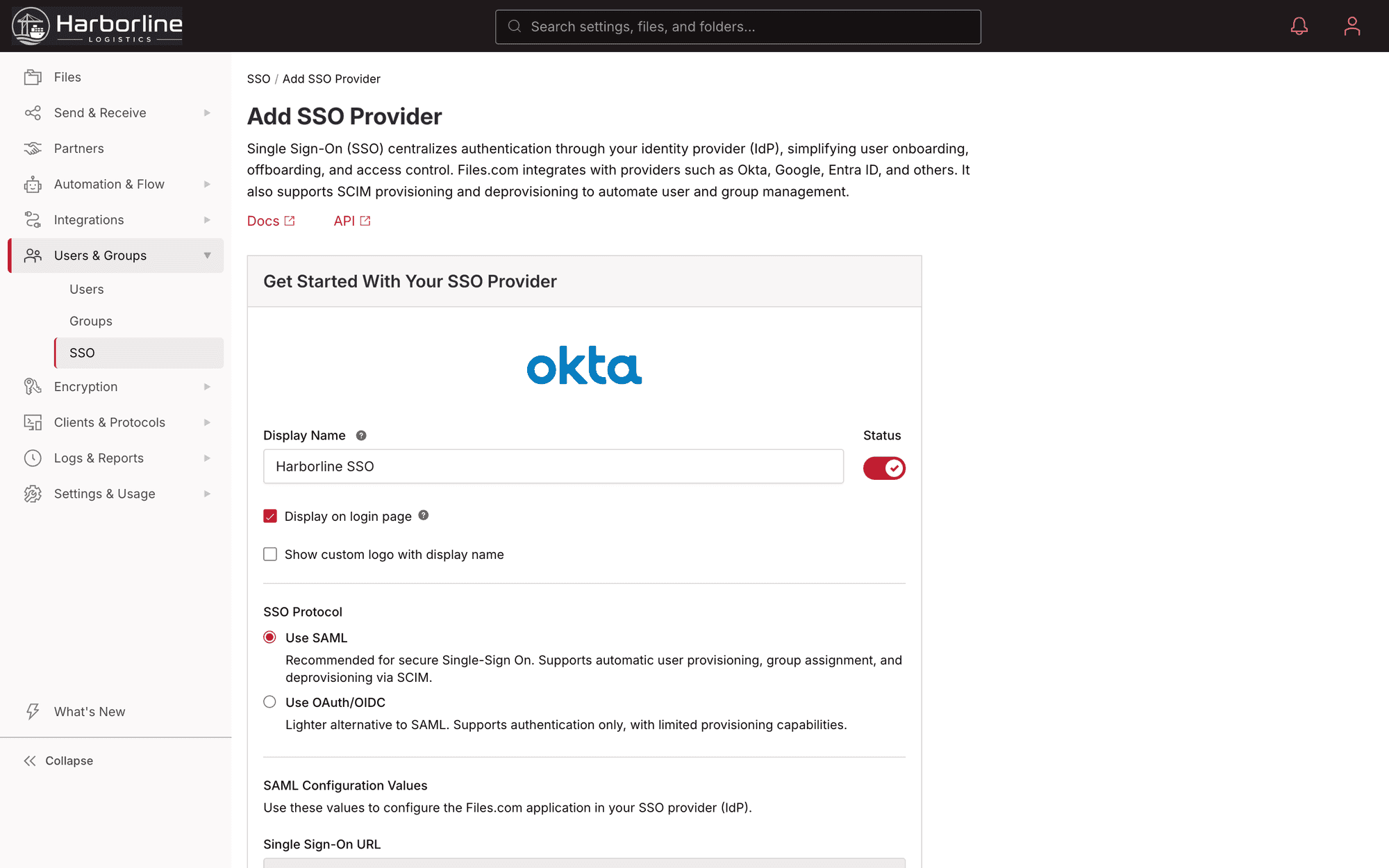
The recommended way in. People sign in to Files.com with their Okta login, and SAML is the only connection method that also carries the automatic new-hire and departure sync (SCIM).
The other sign-in standard. People log in with their Okta account. It handles login only, with no automatic account sync (SCIM).
Turn this on when you want new hires created, changes kept current, departing people turned off, and group membership synced. It is all automatic, with no one touching Files.com.
Nothing extra to set up. This is what happens when account sync (SCIM) is off. Accounts are created the first time someone signs in. Good for getting started fast before you need full automation.
Someone clicks Sign in with Okta on the Files.com login page and logs in with their Okta account. They are in, using the same login they use for the rest of your apps.
Add an employee to the "EDI Team" group in Okta. Files.com creates their account, puts them in that group, and gives them exactly the folders and access that group is meant to have. No manual setup.
HR turns off a departing employee in Okta. On the next sync, their Files.com account is turned off too. SFTP, the web, and the Desktop App are all gone in one step. Nobody has to remember to revoke file access, so a former employee can’t keep a way in you forgot to close.
Your own staff sign in through Okta. Outside partner accounts created in Files.com are required to use Files.com's second-factor check (2FA). The check holds when they connect over SFTP or WebDAV too.
The folder permissions your Okta groups map into: nine levels, granted per person or per group, folder by folder.
Learn MoreEvery Okta sign-in, second-factor check, and account sync is written to a tamper-proof record you can export.
Learn MoreFolder permissions and the second-factor check follow an Okta user onto SFTP, FTP, and WebDAV.
Learn MoreRules that decide how long files stick around once an Okta user has put them in Files.com.
Learn MoreFiles.com let the studio change the exchange beneath a continuously moving, image-by-image workflow without pausing weekly production.
Read The Story
Files.com gave the shared-services team strict identity and data-isolation controls for each house while letting new integrations build on a platform the group had already assessed.
Read The Story
Vendors kept familiar SFTP access while each file landed in the company's own storage for unattended processing.
Read The Story
A hostname under the provider's own name, fixed IP addresses, and one-for-one path mapping let established z/OS workflows keep running across tightly controlled client environments.
Read The Story
“Files.com's strengths are simplicity, ease of use, and the cloud connectors. We don't have to invent custom infrastructure for every partner.”

“Files.com is versatile — it can manage many different situations from a single platform. We've consolidated multiple tools onto it.”

“Files.com is robust and scales to a large enterprise. We get multiple files per minute, per second — and we're a 24/7 organization, so everything has to always be up.”

What to expect when you put Files.com behind Okta: sign-in, account sync, what you pay for synced users, and what happens the day someone leaves.
Yes. Files.com works with Okta over either SAML 2.0 or OpenID Connect (OIDC). We recommend SAML: it covers more cases, and it is the only one that also syncs new hires and departures automatically (SCIM).
Yes. Okta can create accounts, keep them current, and turn them off in Files.com automatically. This is SCIM. It runs over the SAML setup, not OIDC.
No. You can sync your whole Okta directory into Files.com and not pay for the people who never log in. A seat starts counting only once that person signs in for the first time, so what you pay tracks the people who actually use the platform.
When you turn someone off in Okta, the next sync turns off their Files.com account too. Web, SFTP, and Desktop App access are all gone in one step. This only affects the account that was synced from Okta in the first place.
Yes. Files.com keeps a separate, detailed log of every account it creates, changes, or turns off from Okta, so a sync problem is easy to track down. You can see exactly what Okta sent, alongside the main audit log of sign-ins and permission changes.
Yes. Files.com maps which Okta group someone is in to which folders they can open. It can also give members of a named Okta group an admin role through the SCIM setup. The roles are Site Admin, Read-only Admin, or Group Admin.
No. Signing in with Okta works for the browser and the Files.com Desktop App. For SFTP, FTP, or WebDAV, an Okta-managed user adds an SFTP key or an API key to their account and connects with that.
Okta users land in Files.com without their groups when the same Okta group is used both to assign the app and to push group membership. Okta can process the membership update before the account finishes provisioning, and Okta itself does not support using one group for both jobs. Use two Okta groups, one to assign the app and one to push membership, and group membership stays consistent in Files.com.
Start a 7-day free trial. Connect Okta over SAML, turn on account sync, and watch sign-in and new-hire-and-departure updates work against your own directory.
No credit card required • 7-day free trial • Live in minutes