
AS2 And EDI Without The Legacy Server

Exchange files with your trading partners over AS2 without running an AS2 appliance behind it. AS2 is the secure B2B protocol big retailers and clearinghouses require. Files.com is a standards-compliant AS2 endpoint with signed MDN receipts on every message, certificates managed in the app, and a folder for every partner. Your partner connects the same way they always do and never knows what’s behind it, so you answer the mandate without buying and running a server.

The AS2 Your Partners Demand, Without The Headaches

If you sell to a large retailer, file healthcare claims, or supply a manufacturing network, someone on the other end almost certainly requires AS2. The usual way to answer that is to stand up an on-premise AS2 server (Sterling, GoAnywhere, Cleo, Axway) and then live with certificate rotations, capacity planning, and patching for the life of the box.

Files.com runs AS2 without the box. Turn AS2 on, exchange certificates with your partner, and the endpoint is live. It runs with the same governance, scale, and automation as the rest of your file transfers, so there’s nothing separate to operate.

Pillr Health moved its 340B partner exchange off Axway after AS2 transfers and PGP decryption kept failing. On rebuilding those same workflows on Files.com:

“Creating integrations is so easy, especially the AS2 connections. PGP encryption is so seamless to implement.”

Pillr Health
Patti Rhodes, Senior SQL DeveloperPillr Health
Read The Pillr Health Story

How AS2 Works On Files.com

Encrypted, signed, and receipted, with a folder for each partner so files flow in and out.

Encrypted And Signed To The Standard

Files.com receives AS2 over HTTPS on port 443, with S/MIME encryption and signing. The endpoint follows the RFC 4130 standard, so your partner connects exactly the way they connect to anyone else.

Signed Receipts For Every Message

Every transmission comes back with an MDN, a Message Disposition Notification. That is the signed digital receipt that proves your partner got the exact bytes you sent. Files.com supports synchronous and asynchronous receipts, so neither side can later claim a file never arrived, and you never have to wonder whether it did.

A Folder For Every Partner

Turn AS2 on and Files.com creates a folder structure for each trading partner, the company on the other end of the exchange. Each one gets an inbox, an outbox, and a sent folder. Drop a file in a partner’s outbox and it goes out. Files that arrive land in their inbox, ready for the rest of your workflow, so you never wire up the plumbing by hand.

Guaranteed Delivery With Automatic Retries

Outbound messages retry on their own until delivery is confirmed. Paired with the MDN receipt, every transmission either comes back confirmed or shows up as a failure for you to act on. Nothing gets silently dropped.

EDI On The Same Platform

AS2 carries the document byte-for-byte. The platform reads, converts, and validates it alongside the transport.

Translation As Configuration

TransformScript parses and transforms X12 and EDIFACT documents natively, so the 850 that arrives becomes the file shape your ERP ingests. You write the mapping as expressions in the platform, not as a translator you build and host.
The Fields, Not Just The File

File extraction pulls fields out of EDI documents into searchable metadata, and content validation reads inside the parsed document, flagging the delivery whose contents are wrong, not just missing.

Whoever Mandated AS2, Our Customers Already Connect

Files.com customers exchange AS2 and EDI with effectively every major trading partner. The big retailers and distributors mandate it from their vendors, the healthcare clearinghouses mandate it from their filers, and Files.com presents to each one as a standards-compliant RFC 4130 endpoint. Your partner connects the way they connect to everyone else, and the mandate is answered.

  • Walmart
  • Amazon
  • Target
  • The Home Depot
  • Lowe’s
  • Costco
  • Kroger
  • Walgreens
  • CVS
  • McKesson
  • Cardinal Health
  • Availity
  • Change Healthcare
  • Optum

Run It Like The Rest Of Your Platform

Certificates Managed In The App

Upload, renew, and rotate the encryption and signing certificates for each partner right in the Files.com UI. Expiration alerts warn you before a certificate lapses, so a missed renewal never takes a partner offline. You stop editing connection scripts on a server every time something rotates.

No Appliance Behind It

Your partner sees a standards-compliant AS2 endpoint and never knows what’s behind it. There’s no on-premise AS2 server to size, patch, or babysit. You skip running Sterling, GoAnywhere, Cleo, or Axway just to answer one AS2 mandate.

AS2 As A Workflow Step

AS2 is a first-class part of Workflows and Automation. A file landing in a partner’s inbox can trigger a workflow. Any workflow can deliver its result out to a partner over AS2 as the final step. It works in both directions, so a partner exchange can drive automation and automation can drive a partner exchange.

Scales With The Traffic

When a partner sends a spike of traffic, Files.com expands to absorb it. No per-endpoint sizing, no capacity planning. An appliance in a rack can’t do that.

Make It Effortless

The AS2 world treats key-signing ceremony as the point: strict validation chains, rejected transmissions, hours spent comparing certificate fingerprints. And the documents being protected are inventory files and shipment manifests, the paperwork that used to ride taped to the side of a pallet. AS2’s signing ceremony is wildly out of proportion to the documents it protects, and much of it survives because legacy vendors profit when AS2 is hard.

Files.com defaults to making the delivery work. Auto mode reads the first message from a partner and locks validation to the most secure level that partner actually supports. Nobody spends a week tuning settings, and an expired certificate doesn’t strand a shipment your business is waiting on. When a partner genuinely requires strict validation, turn it on: full chain-of-trust enforcement is a per-partner setting, not a different product.

Bring Your Partners Onto The Platform

Setting up a new AS2 partner is part of onboarding them onto Files.com. Each partner gets a self-contained space and exchanged certificates, handled through partner onboarding. If a partner wants an extra encryption layer, you can wrap files in PGP encryption on top of the AS2 exchange.

AS2 is available on the Power tier and above, and Enterprise includes as many connections as you require. Files.com publishes what each plan includes.

See Partner Onboarding
app.files.com
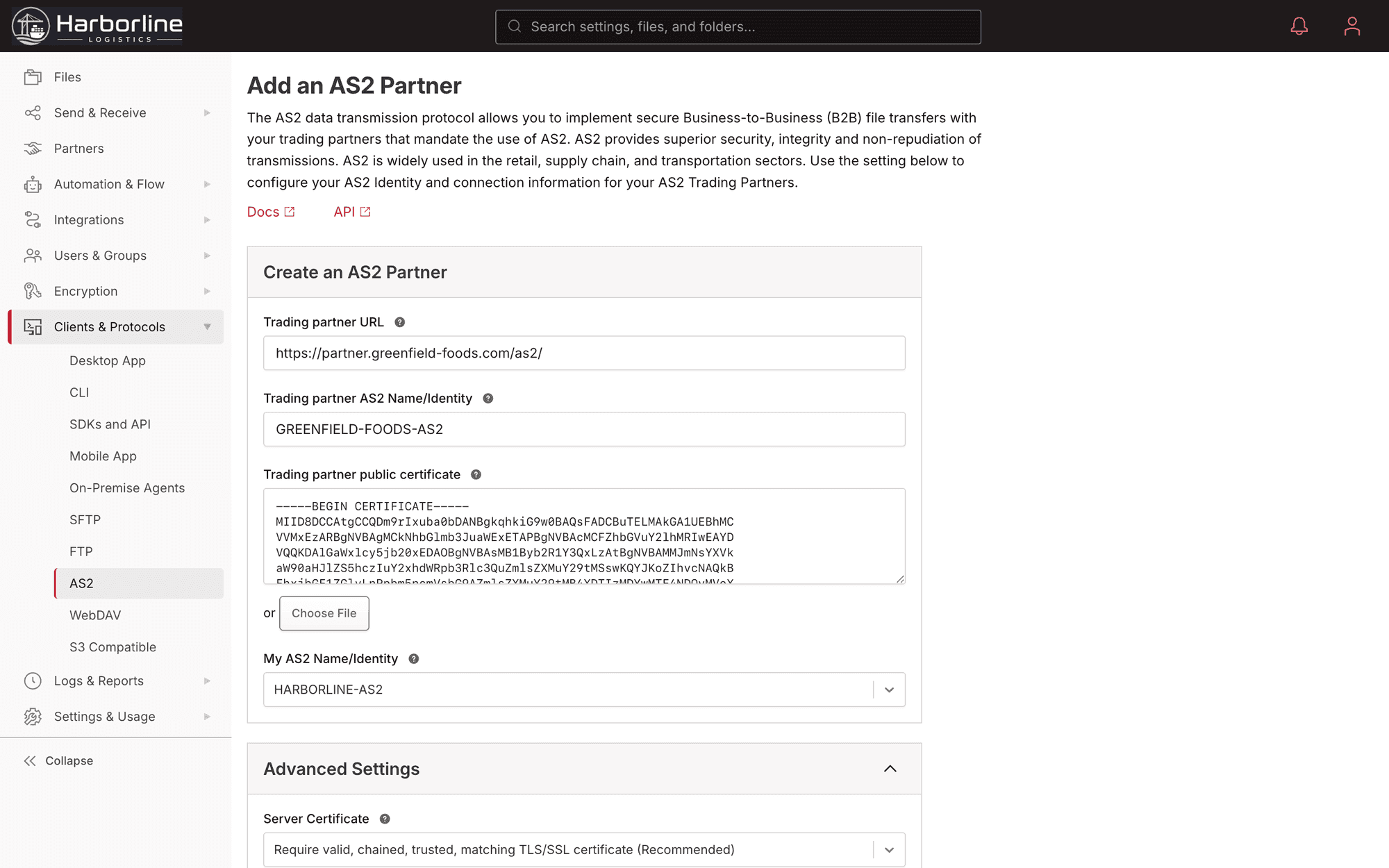
The Files.com AS2 partner configuration: per-partner endpoint, encryption and signing certificates, and MDN receipt settings

AS2 And EDI Questions

What teams ask about how Files.com handles AS2, MDN receipts, EDI, and compatibility with their trading partners.

Exchange AS2 The Modern Way

Start the 7-day trial, exchange certificates with your trading partner, and have a standards-compliant AS2 endpoint running. You get signed receipts and automatic retries, with no appliance to operate.

No credit card required • Free for 7 days • Live in minutes