CI/CD Artifact Delivery
Push build artifacts from your pipeline to Files.com over S3 the way you push to a bucket today. Your CI config barely changes, and the files land where the rest of your team and workflows can reach them.
Files.com presents your site as an S3 bucket, so any S3 client, SDK, or CI pipeline runs PUT, GET, and LIST against it with no code change. Stop writing a custom integration for every system. Point the S3 tools your team already has at Files.com instead. The files they push trigger your automations, follow your permissions, and land where the rest of your workflows can reach them.
Half the cost of adopting a new file platform is the integration work: rewriting the scripts, swapping the SDK, retraining the pipeline that already knows how to talk to a bucket. The S3 endpoint removes that cost. Anything that already speaks S3 can reach Files.com directly, with the code it already has. That covers your tools, your apps, and your automations.
The endpoint is the access layer, not the storage layer. The same files you read and write over S3 are reachable over SFTP, FTPS, and the web. They sit on top of whichever backend you run: Files.com storage or your own connected bucket. You get S3 access without locking your data into one store.
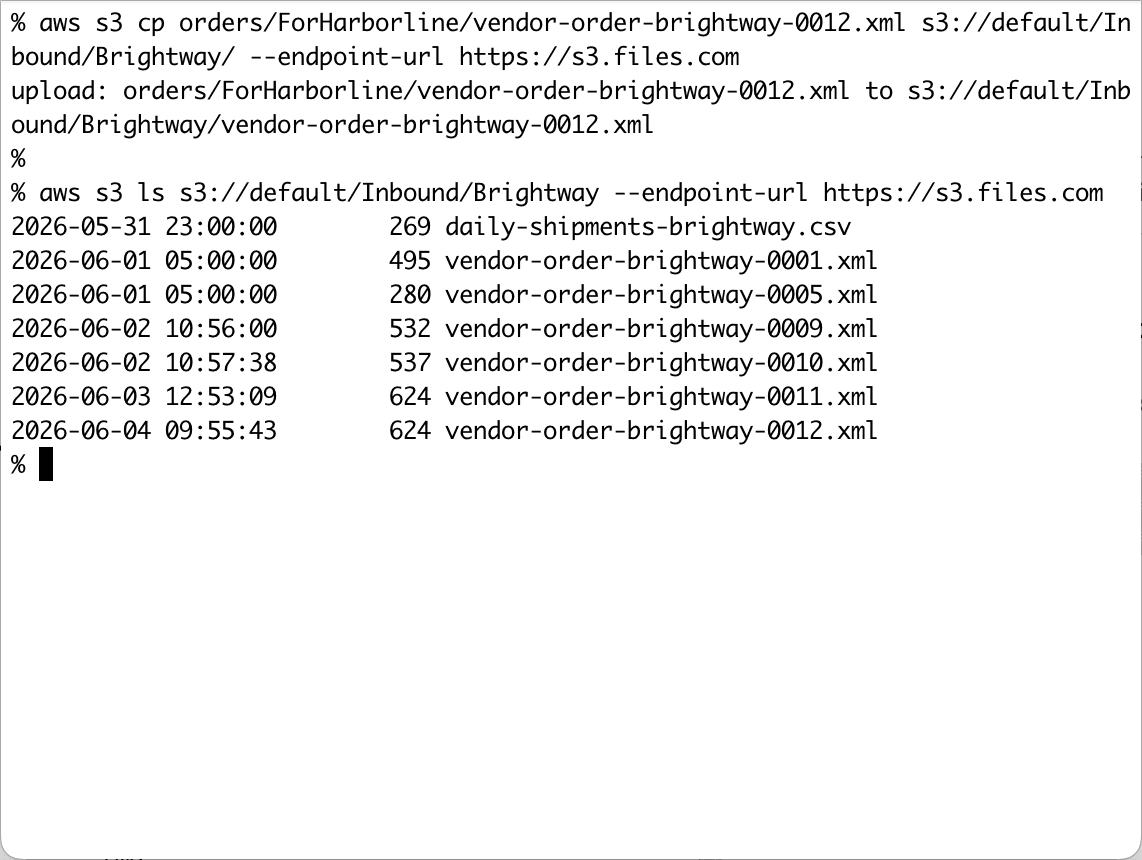
A real S3 surface, built and maintained by Files.com. It takes standard clients, SigV4 keys, and both addressing styles.
Files.com presents your site as an S3 bucket over HTTPS on port 443. Any standard S3 client or SDK connects and runs PUT, GET, and LIST against it the way it would against AWS. There is no special build, so the tools you have today work as-is.
Authentication uses S3-compatible API keys (an Access Key ID and Secret Access Key) over AWS Signature Version 4 (SigV4), the same signing scheme S3 clients already use. Any SigV4-capable client works normally.
Both addressing styles work: path-style (s3.files.com/default/path) and virtual-hosted-style (mysite.s3.files.com/path). Region is ignored, so a client that insists on us-east-1 connects fine and you don’t have to reconfigure it.
Files.com builds and maintains the S3 endpoint itself. It isn’t a third-party gateway bolted on the side. It’s part of the platform, supported by the same team that supports everything else.
Push build artifacts from your pipeline to Files.com over S3 the way you push to a bucket today. Your CI config barely changes, and the files land where the rest of your team and workflows can reach them.
Lab equipment, instruments, and cloud rendering platforms often speak only S3. Point them at Files.com instead of a bucket, and you write no custom integration for each one.
An S3 user key inherits that Files.com user’s exact permissions and folder access, so people see only what they’re authorized to. The same logging, link sharing, and access control cover S3 traffic and every other protocol alike. You don’t maintain a second set of rules for S3.
A file pushed over S3 fires your automations, shows up in syncs and remote mounts, and follows your retention rules, exactly like an upload over SFTP or the web. Nothing about it is treated as second-class.
S3 traffic doesn’t get its own rulebook. A file that arrives over S3 is governed like a file that arrives any other way. When the security review asks how S3 uploads are controlled and logged, you give the same answer you give for SFTP. Your controls hold no matter how a file arrives.
The S3-compatible endpoint is included on every plan, alongside the SFTP and FTP support and the rest of the protocol surface. See what each plan includes on the pricing page.
What teams ask about pointing their existing S3 clients, SDKs, and pipelines at Files.com.
Files.com presents your site as an S3 bucket, so any standard S3 client, SDK, or CI pipeline runs PUT, GET, and LIST against it with no code change. Point the client at the Files.com S3 endpoint, give it your S3-compatible API key, and it works the way it does against AWS.
The Files.com S3 endpoint runs on whatever storage backend you already use: Files.com-managed storage or your own connected bucket. The endpoint is the access layer, and the same files are reachable over SFTP, FTPS, and the web. You get S3 access without committing your data to one specific store.
The Files.com S3 endpoint authenticates with S3-compatible API keys (Access Key ID and Secret Access Key) using AWS Signature Version 4. Any SigV4-capable client or SDK signs requests the way it already does, so most tools need only the endpoint URL and the keys.
For PUT, GET, and LIST the Files.com endpoint behaves like S3, but it is not a complete clone of every S3 behavior. It does not do recursive listings. A LIST returns the items directly inside the targeted folder, and the prefix parameter filters within a folder rather than walking subfolders, because Files.com keeps a true directory structure instead of S3’s logical-prefix model. Workflows that depend on recursive listing need a careful look first.
An S3 user API key inherits that Files.com user’s permissions, folder access, and restrictions, so users reach only what they’re authorized to. The same activity logging, automations, syncs, and link sharing that cover the rest of the platform cover S3 traffic too.
The S3-compatible API is included on every Files.com plan, from Starter up. Any site can generate S3-compatible keys and point standard S3 clients at the endpoint. Plans differ on included users, connections, and storage. The pricing page lists what each includes.
Start a 7-day free trial, generate an S3-compatible key, and point your existing S3 client or pipeline at Files.com. Run PUT, GET, and LIST with no code change.
No credit card required • Free for 7 days • Live in minutes