
Retire The File Server, Keep The Drive Letters

Files.com replaces an aging Windows file server or NAS with cloud storage that mounts as the exact same drive letters your filer used: J:, W:, Z:, at the exact same paths. Every login script, scheduled task, Office template, and line-of-business app keeps resolving. The path doesn’t change. Only the storage behind it does.

Keeping it is the expensive option. That box is a liability with your name on it: one failed drive from a bad weekend, a backup you have to hope restores, and a refresh quote that just buys three more years of the same. Files.com retires it for good. IT sets the drive-letter mappings once and enforces them fleet-wide, new hires get the right drives on day one, and there’s no hardware to refresh, no closet, and no 2 a.m. page when a volume fills.
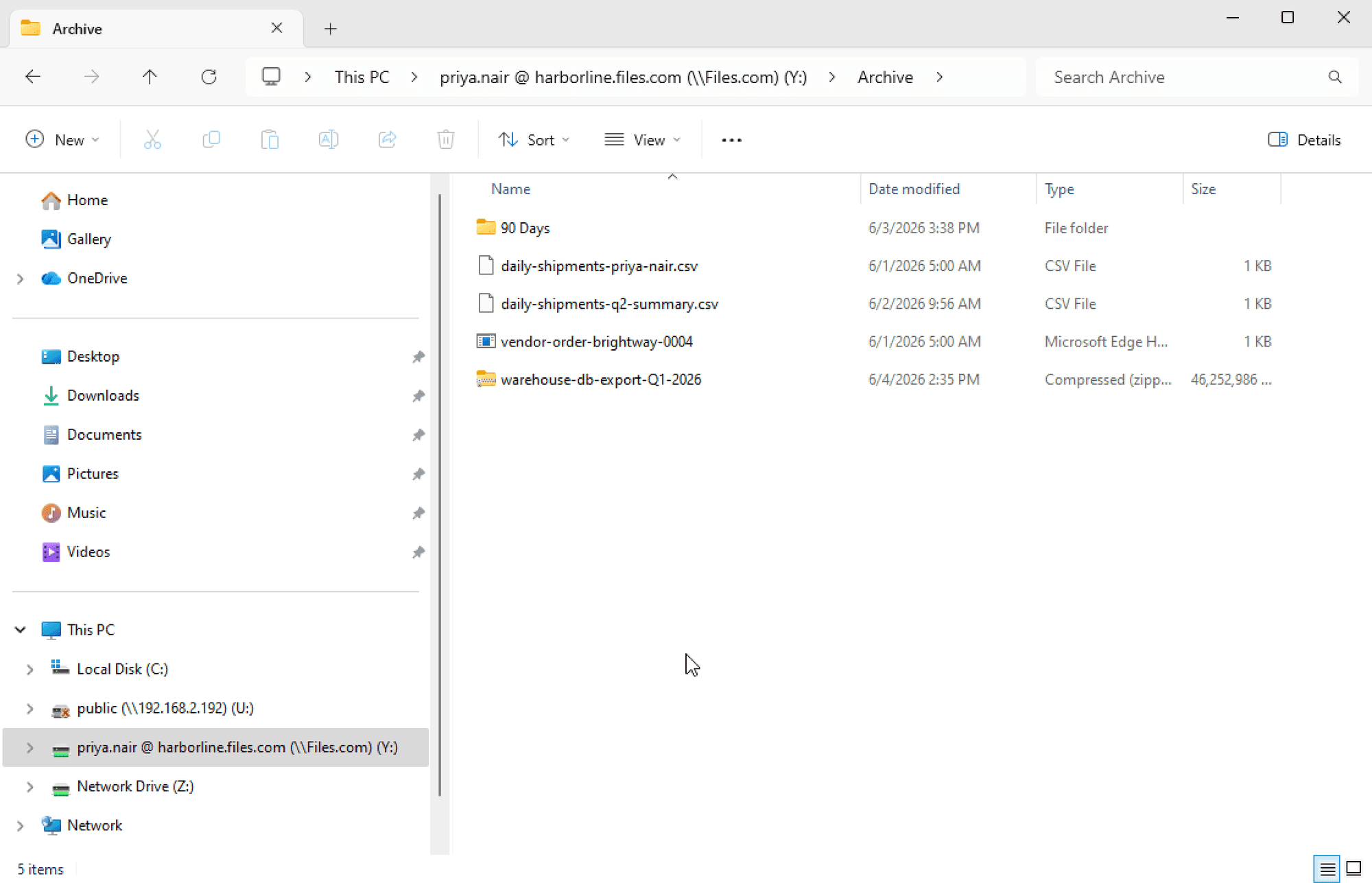
Same drive letters on Windows
No hardware to refresh
No credit card to start
The Files.com desktop app mounting cloud storage as a mapped drive in Windows Explorer, keeping the original drive letter and paths

The Drive Letters Survive The Move

Copying the data is never the hard part. The hard part is everything that points at the old server: every J: mapping, every hard-coded path in a script or app. That is what kills the project. Files.com keeps all of it exactly as it is.

The Same Drive Letters, On Day One

Pin a connection to J:, W:, or Z:, the exact letters your filer used. The Desktop App mounts that drive in Windows Explorer every time, instead of grabbing the next free letter, so the drive a user opens this morning is the one their muscle memory and their scripts expect.

Set The Mappings Once For Everyone

An administrator decides which letters point at which folders in a Desktop Configuration Profile, then assigns it to one person, a Group, or the whole company. The drives mount on their own, locked so users cannot change them. You set it up once instead of touching every workstation.

Hard-Coded Paths Keep Resolving

Login scripts, scheduled tasks, Office templates, Access databases, VBA macros, and line-of-business apps with Z:\shared\ wired inside them keep working. The path doesn’t change. Only the storage behind it does.

Streamed, Not Synced

Files download when someone opens them and upload when they save. Nothing is copied to every laptop up front, so a 2 TB share does not have to fit on a 256 GB laptop. The drive acts like the old NAS, and because the transfer is fast, it feels like a local disk.

How Files.com Does It

Four things the platform already does, set up together to retire a file server.

The Desktop App That Keeps The Drive Letters

In Mounted Drive Mode, the Desktop App shows cloud storage as a mapped drive in Windows or a named volume in macOS Finder. You set the drive-letter mappings centrally and push the installer out silently through SCCM, GPO, Intune, or PDQ. The move finishes across every machine at once instead of one desk at a time.

The Storage That Lives Behind The Drive

Behind the drive can be Files.com storage, or a Remote Server Mount pointed at the S3, Azure Blob, or Google Cloud bucket you already pay for. Either way the user sees the same drive letter. Where the files actually live is your call, and they never have to know, so you can move storage later without retraining anyone.

Identity That Decides Who Sees Which Drive

Access follows the directory you already run, with SSO across Entra ID, Okta, Active Directory, Google, and any SAML provider, with SCIM. Nine permission levels per user or Group decide who can read, write, or contribute. When someone leaves, you cut their access in one place in your identity provider, and their drives go with them, so a departed employee can’t still reach files you forgot to revoke.

A Bridge For The Shares That Stay On-Prem

Some data has to stay local, like a manufacturing floor or a branch office. The Files.com Agent connects that SMB or NFS share to the platform over an outbound-only connection, so there are no inbound firewall changes and no VPN. Users reach it through the same drive letters as everything else.

Files.com is a secure and easy-to-set-up product with multiple integration options for on-premise servers or any of the public cloud servers. We can have Active Directory-based corporate authentication as well as local user creation on their platform, and we can manage permissions independently.
Ajay Kadu, Infosys
Ajay Kadu
Lead Consultant, Infosys
Files.com is versatile — it can manage many different situations from a single platform. We've consolidated multiple tools onto it.
Regis Litre, Rag & Bone
Regis Litre
Chief Information Officer, Rag & Bone

4,000 organizations rely on Files.com every day

Real companies. Real file flows. Real results.

Marc Jacobs logo
Equifax logo
Cognizant logo
Banner Health logo
Bloomberg logo
Norton Rose Fulbright logo
TowneBank logo
Michelin logo
PBS logo
Redis logo
Carrier logo
e.l.f. logo

The Four Paths Off The Old Filer

When you retire a file server, you are usually choosing between another hardware refresh, a cloud-NAS gateway, Egnyte, or a tool like Box or SharePoint. Here is how Files.com stacks up against each.

Against Egnyte

Files.com keeps the drive letters and the hard-coded paths your scripts and apps depend on. Egnyte gives users a sync folder, not J: at the original path. The Files.com bill is usually a fraction of Egnyte’s, cheaper per gigabyte and per user.

Against Cloud-NAS Gateways

Files.com keeps the paths with the Desktop App and a configuration profile, with no appliance to run. Nasuni and CTERA put an appliance in front of cloud storage that you have to deploy, patch, and maintain. And the same Files.com storage is also a full sharing, automation, and audit platform, so it does more than the gateway it replaces.

Against Another Hardware Refresh

A new NetApp, Isilon, or HPE filer leaves you the same single point of failure, the same backup burden, the same maintenance contract, and the same end-of-life conversation in three years. Files.com routinely lands at a lower total cost, with no appliance, no support contract, and no refresh cycle, so the three-year clock never starts again.

Against Box, SharePoint, And Dropbox

Files.com is the one option where the storage moves and every drive letter and hard-coded path stays put. Box, SharePoint, and Dropbox give users a new sync folder, and none of them can show the cloud as J: or Z: at the exact same paths. With a sync folder you go through every script and app to fix the paths by hand.

Keep The Paths, Cut The Bill

The only reason a hardware refresh feels safer than the cloud is the drive letters. Files.com keeps those, so the safer choice is also the cheaper one. No appliance, no maintenance contract, and no refresh every three years. It is usually a fraction of the cost of Egnyte, and cheaper per gigabyte and per user. Files.com publishes its pricing, so you see the number before you ask.

That turns “we’d kill the file server if we could fix all those paths” into a weekend job. The move actually finishes, because the paths never change.

Compare Plans

The Controls The Filer Never Had

The storage that replaces the box in the closet comes with the audit log, identity, and compliance a file server was never built to give you.

Governed, Audited, Durable

The storage that replaces the filer is held off-site, encrypted with AES-256 at rest and TLS in transit, and every file action is written to an audit log no one can edit. The box in the closet gave you none of that.

Compliant Out Of The Box

SOC 2 Type II, PCI DSS, and CSA STAR, with a HIPAA BAA and GDPR DPA available. Used in production by banks, healthcare, and other regulated industries.

Enterprise Identity

SSO and SAML against Microsoft Entra ID, Okta, Active Directory, Google, OneLogin, and Auth0, with SCIM provisioning, nine permission levels, IP allowlisting, and password policies.

Support From People Who Know The Platform

Planning the move means drive-letter profiles, silent deployment, and identity. That is the kind of thing you want a real engineer on the other end of the line for.

An All-Engineer Support Desk

The people who answer the phone are engineers who know the platform, not a tier-one queue reading a script. When a drive mapping or a profile misbehaves, you reach someone who can fix it.

Onboarding Included

Get drive-letter profiles, identity, and storage stood up fast. Strategic enterprise deployments get our onboarding people embedded as forward deployed engineers.

Documentation That Goes Deep

Thorough docs cover the EXE-installer requirement for Mounted Drive Mode, silent fleet deployment, and Configuration Profile precedence. You can plan the whole cutover before you start it, instead of finding the gotchas mid-migration.

File Server Replacement FAQ

What IT teams ask most when retiring a filer onto Files.com.

Retire The Filer Without Breaking What Points At It

The same drive letters, the same paths, on cloud storage you never have to refresh, with the governance and audit the old file server never had. Stand up a drive-letter profile on a real workstation during the free trial.

No credit card required • Free for 7 days • Live in minutes




























