Files.com Named the #1 Easiest-to-Use Managed File Transfer Platform by G2
July 24, 2025
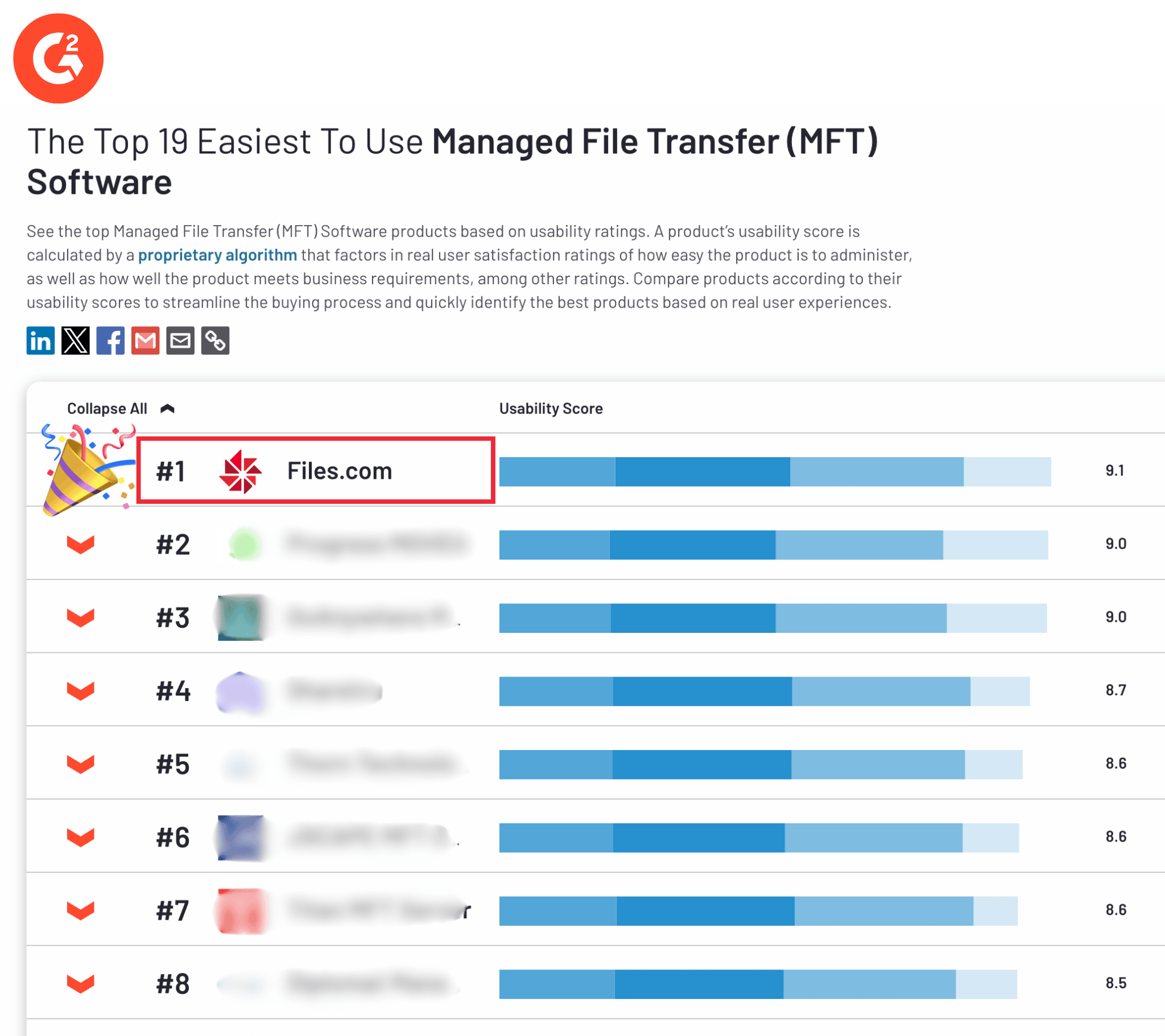
Files.com has been named the #1 easiest-to-use Managed File Transfer platform by G2, the world's largest software marketplace. Managed File Transfer (MFT) is the category of tools companies use to move files securely between systems, partners, and people, with logging and automation built in. The recognition comes from the people who matter most: our users.
Simplicity That Doesn't Sacrifice Power
Files.com was built to make automated file transfers secure, simple, and accessible. As a cloud-native MFT platform, it gives organizations a secure place to store, transfer, and automate file workflows, without the complexity that bogs down older tools.
Many MFT tools take deep technical knowledge to run. Files.com does not. Users consistently praise the intuitive interface and fast setup, even for advanced protocols like SFTP — the encrypted version of FTP that moves files over an SSH connection. If you want the longer explanation, our guide to what SFTP is and how it works walks through it.
Reviewers specifically called out how easy it is to create SFTP folders and manage permissions — an area usually known for being time-consuming and difficult.
Empowering Non-Technical Teams
What sets Files.com apart is that non-technical people can use it too. Reviews point to a smooth experience that lets cross-functional teams manage folders, set permissions, and handle file governance without waiting on IT.
By removing the technical barriers, organizations can:
G2 reviewers praised Files.com for making file management feel almost effortless. Setting up folders and assigning access takes a few clicks, and once it is configured, the environment stays low-maintenance — so teams focus on their work, not the tooling behind it.
Users also love the automation. With rule-based workflows, Files.com can trigger a transfer, move a file, or organize data on its own the moment something arrives. That removes the manual step where errors creep in, and it keeps mission-critical jobs running on time.
Built for Scalability, Backed by Flexibility
For teams with more advanced needs, Files.com offers programmatic access through its API and SDKs. Developers can build custom integrations, handle edge cases, and scale operations — all inside the same secure, centralized platform.
Even with the focus on ease of use, Files.com never trades away flexibility or performance. That is why technical and non-technical users alike trust it to move their most sensitive data.
How Is This Calculated?
G2's Ease of Use index is based on real user reviews and a scoring algorithm that weighs factors like:
Ease of use
Ease of admin
How well the product meets requirements
User adoption rates
To qualify, a category has to include at least 150 reviews and at least six products with enough usability data — which makes this a competitive benchmark, not a vanity badge.
Why Being Recognized Matters
This recognition is validation of a simple mission: make managed file transfers easy, scalable, and stress-free for everyone who touches them. Files.com is the cloud-native File Orchestration Platform — one platform that replaces the stack of separate tools IT teams run to move files: SFTP and FTP servers, MFT suites, file-sharing apps, and the scripts holding them together. It speaks every protocol, connects to 50+ cloud and on-prem systems, automates every transfer, and keeps a complete audit trail — and, per G2's reviewers, it does all of that while staying the easiest one to actually use.
Files.com has been recognized as a G2 Grid® Leader for Spring 2025, earning high ratings in customer satisfaction and market presence. See why users trust us for secure, automated file transfer and cloud storage.
Files.com has earned FedRAMP Class A certification under FedRAMP 20x. What the certification covers, what comes next, and where to find our security documentation.