January 7, 2025
Introducing Desktop v6
The Files.com Desktop v6 app is a Windows and macOS application built for high-speed, large-scale file transfers between your desktop and Files.com — gigabytes of data or thousands of files in a single run.
Files.com sites handle complex environments every day. Multiple teams, hundreds of users, dozens of remote server connections, automations, and partner relationships across business lines, all managed by Site Administrators with full control.
As organizations keep scaling, the administrative workload concentrates on the same small group of Site Administrators. Automations, remote servers, folder structures, and partner configurations from different teams all live in the same place. One team's configurations overlap with another's.
Teams step on each other's workflows without realizing it. Troubleshooting turns into guesswork. Misconfiguration turns into risk.
Growing organizations need delegated administration with structural separation. Each team needs their own isolated environment where they manage their own users, partners, automations, and integrations on a self-service basis. They need a focused view of only their resources. And they need a hard boundary that prevents them from seeing, touching, or breaking anything outside their environment. At the same time, site-wide security, authentication, compliance policies, and governance need to stay centralized under the Site Administrator, applied consistently across every environment.
That is exactly what Workspaces do. A Workspace is a walled-off section of your Files.com site: its own users, its own automations, its own partners, with nothing leaking across the wall. Workspaces are now available in the Files.com platform.
A Workspace is an isolated, self-contained environment within your Files.com site. Each Workspace gets its own users and groups, partners, folders, automations, remote servers, syncs, notifications, and data governance settings. Nothing inside a Workspace is visible to any other Workspace.
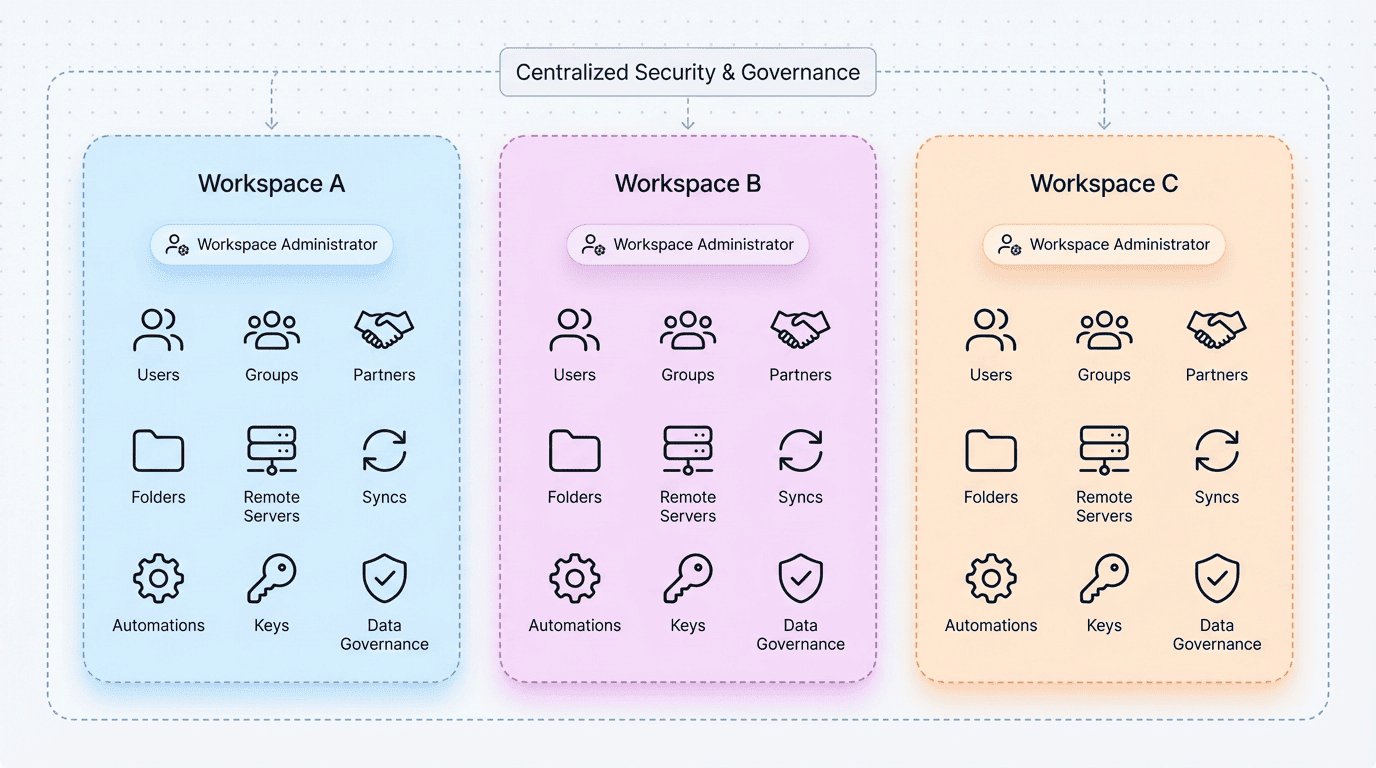
A Site Administrator creates a Workspace and assigns a Workspace Administrator to run it. The Workspace Administrator then handles everything on a self-service basis: onboarding users, offboarding contractors, setting up remote servers, configuring automations, managing partners, and applying data governance policies. No tickets. No waiting.
The Site Administrator keeps full visibility and control over the entire site. Site-wide security, authentication, branding, and compliance stay centralized. Workspaces delegate operations without giving up governance.
Concepts like security domains, multi-tenant organizations, and business units have existed across file transfer platforms for years. But most implementations come with trade-offs: licensing caps on the number of partitions, heavy-weight multi-tenancy that requires separate infrastructure for simple departmental separation, view-based filtering that depends on admin behavior rather than architectural enforcement, and limited delegation that still requires the global admin to step in for common tasks.
Workspaces avoid all of these trade-offs. They are unlimited with no licensing caps. They are lightweight, sharing site-wide security and branding while providing complete operational isolation. The isolation is structural, not cosmetic.
The self-service is real. Workspace Administrators create users, reset passwords, onboard partners, configure remote servers, set up automations, manage encryption keys, and apply data governance policies end to end, on their own schedule.
Files.com already has Child Sites for full site-level isolation, where each child is effectively its own separate site. Use Child Sites for hard boundaries between fully independent tenants. Use Workspaces for operational independence within a single shared site.
Business units and departments. A financial services company gives Lending, Insurance, and Wealth Management each a Workspace. A healthcare organization separates clinical operations, research, and billing so patient data never crosses departmental lines. A law firm creates a Workspace per practice group so client files are structurally inaccessible across groups.
Client engagements and projects. A managed services provider creates a Workspace per client engagement. No client's data, automations, or integrations can intersect with another's. A construction firm does the same per project and tears down the environment when the project wraps.
Agentic and automated workflows. Organizations building AI-driven automations use Workspaces as secure, isolated execution environments. Each agent operates within a Workspace boundary with access only to the resources within that Workspace. The isolation is structural, not policy-based.
Testing and experimentation. A Site Administrator creates a temporary Workspace to test new automations, validate remote server connections, or prototype workflows before rolling them out to production. Creating a Workspace requires minimal setup, and removing it when done does not affect any production resources.
Creating a Workspace takes minimal setup. Create a new Workspace, assign a Workspace Administrator, and they build out the environment from scratch: a clean slate for their team, department, or project.
Workspaces can be created through the Web App. They can also be provisioned automatically as part of onboarding workflows or infrastructure-as-code practices through the API, CLI, and SDKs or Terraform.
Read the full documentation:
Workspaces are part of the Files.com File Orchestration Platform: one platform that gives every team its own isolated environment while site-wide security, authentication, and compliance stay centralized under the Site Administrator. See Workspaces and Child Sites, or start a free trial — no credit card, live in minutes.
The Files.com Desktop v6 app is a Windows and macOS application built for high-speed, large-scale file transfers between your desktop and Files.com — gigabytes of data or thousands of files in a single run.
The current Remote Server Sync functionality is being replaced by the new Sync. The new Sync offers more flexibility and reliability, but the most important point is that it will become the standard going forward.

Adding file uploads to a SaaS product shouldn't mean building a file system. Here's the build-vs-buy math, the hidden work that file features turn into, and how to ship secure, enterprise-grade file infrastructure without standing up your own storage team.
4,000+ organizations trust Files.com for mission-critical file operations. Start your free trial now and build your first flow in 60 seconds.
No credit card required • 7-day free trial • Live in minutes